
Features
Labels, legend & PDF
Sheets that look like they came from a drafting office: labels that read like a spec, a legend that fits, a title block with your logo – and every sheet in one PDF.
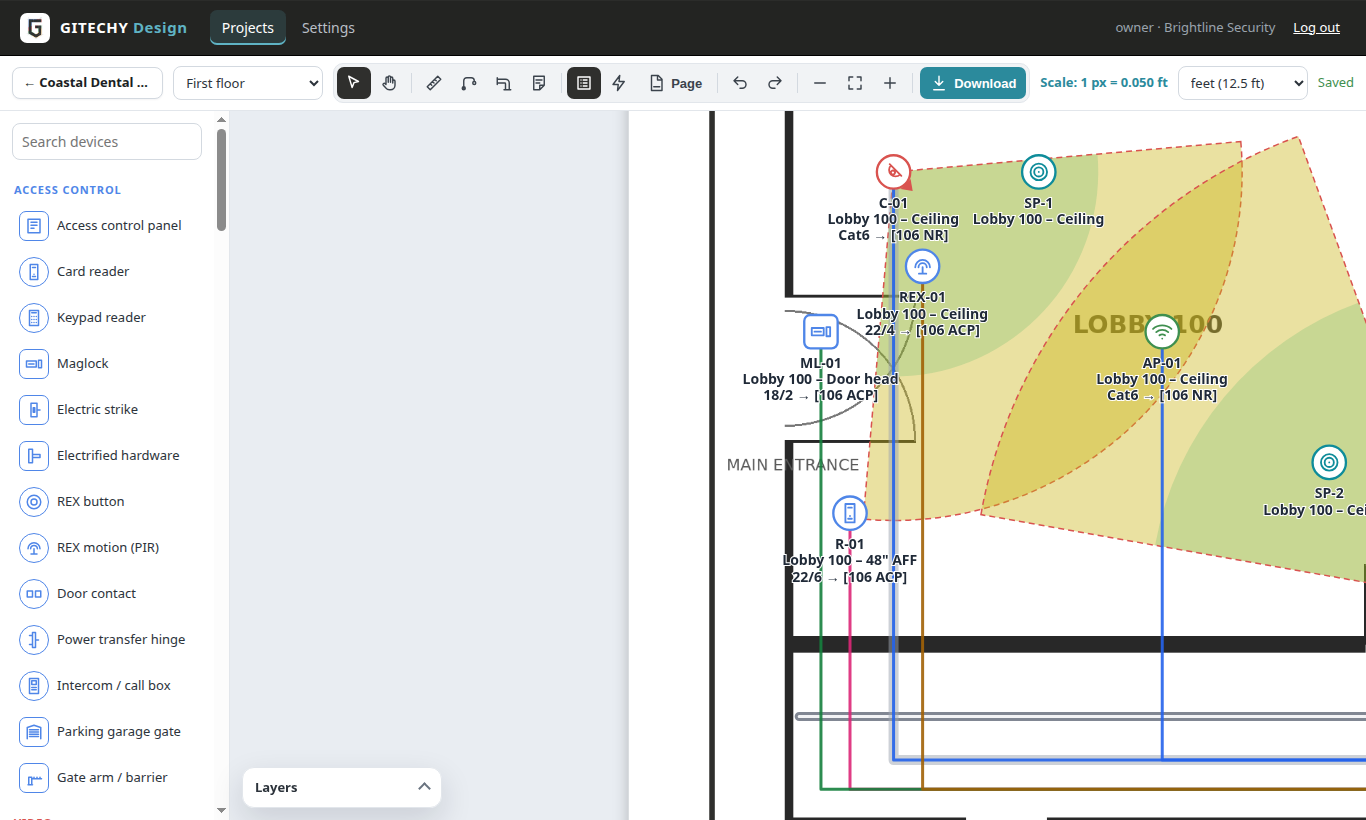
Standard labels
Device label on top, then room – location (103 – 18″ AFF, Ceiling), then cable → [destination room and abbreviation], e.g. “CAT6 → [MDF NR]”. Bold, rotated or set apart with a leader line.
Legend in any shape
Tall list, two or three columns, a wide strip or compact – choose what it shows: counts, cable lengths, conduit, abbreviations key, labels, notes; drag its corners to resize.
Paper and plan size
ANSI A–E, ARCH C/D/E, A3, A1 … drag and resize the plan on the page to make room for the legend.
Title block
Logo, company, project, client and site, sheet, note, revision and date, page “2 of 5” and the scale on paper.
Every sheet in one PDF
Download one sheet as PDF, PNG or JPG – or all sheets of the project in one PDF, each at its paper size and 250 dpi.
Colours and line widths
Any colour for icons, cable runs and conduit, and wide lines when the wiring must stand out – conduit-only or wiring-only plans with the layers.
Questions
Does the scale stay right on paper?
Yes – with a paper size chosen, the title block shows the printed scale, e.g. 1 in = 16 ft.
Design your next job with GITECHY Design
One flat price per company – unlimited designers.